> ## Documentation Index
> Fetch the complete documentation index at: https://docs.getseam.ai/llms.txt
> Use this file to discover all available pages before exploring further.
# Welcome to Seam
> Turn intent signals into pipeline with AI agents that automate prospecting, enrichment, and outbound
## What is Seam AI?
Seam AI is an AI-native account-based marketing platform that helps B2B teams generate pipeline faster and more efficiently. Our platform uses AI agents to automate the entire ABM workflow, from identifying best-fit accounts to executing multi-channel campaigns when buying signals spike.
Track intent signals across accounts and buying committees in real-time
AI agents validate ICP fit and enrich accounts with deep, custom research
Automatically deploy campaigns across email, ads, and SDR outreach
## How Seam works
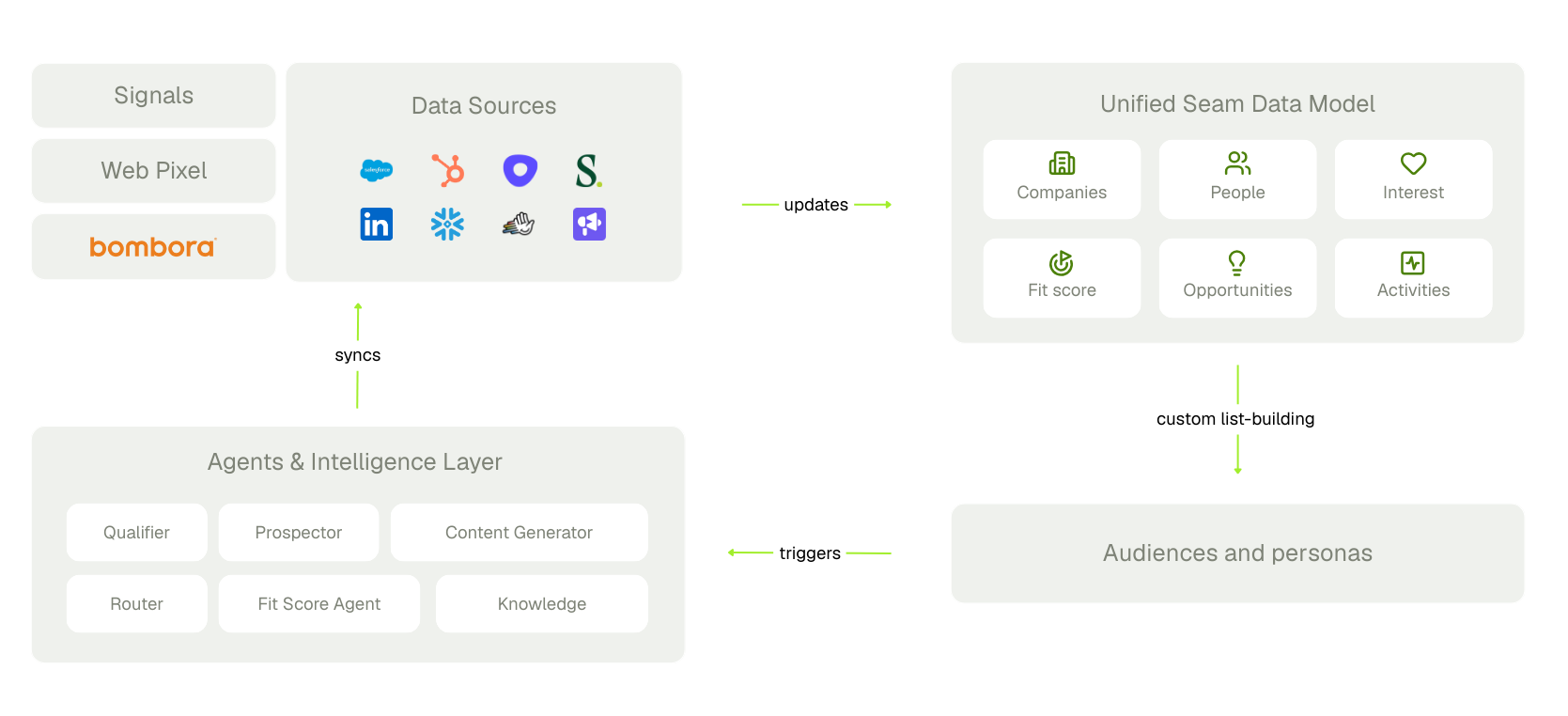 Seam replaces manual ABM processes with AI agents that work 24/7:
1. **Connect your data** - Integrate your CRM, marketing automation, and data sources
2. **Configure your ICP** - Define what makes an account a good fit using custom criteria
3. **Set up monitoring and intelligence** - Track intent signals across 1st and 3rd party sources
4. **Launch plays** - Create automated campaigns triggered by fit, intent, and signals
5. **Drive pipeline** - Watch as Seam sources contacts and generates measurable opportunities
## What you'll find here
This documentation is organized to help you get the most out of Seam AI:
Set up your account and complete initial configuration
Connect data sources and configure your data model
Build fit scores, track intent, and create audiences
Set up routing rules and automated plays
## Need help?
Talk to our team about your use case
Get help from our support team
**New to ABM?** Don't worry, our documentation assumes no prior ABM platform experience. We'll guide you through everything you need to know.
Seam replaces manual ABM processes with AI agents that work 24/7:
1. **Connect your data** - Integrate your CRM, marketing automation, and data sources
2. **Configure your ICP** - Define what makes an account a good fit using custom criteria
3. **Set up monitoring and intelligence** - Track intent signals across 1st and 3rd party sources
4. **Launch plays** - Create automated campaigns triggered by fit, intent, and signals
5. **Drive pipeline** - Watch as Seam sources contacts and generates measurable opportunities
## What you'll find here
This documentation is organized to help you get the most out of Seam AI:
Set up your account and complete initial configuration
Connect data sources and configure your data model
Build fit scores, track intent, and create audiences
Set up routing rules and automated plays
## Need help?
Talk to our team about your use case
Get help from our support team
**New to ABM?** Don't worry, our documentation assumes no prior ABM platform experience. We'll guide you through everything you need to know.